How to Clone a Voice on a Speech-to-Speech Model for AI Phone Calls
A practical guide to running a cloned voice on a real-time speech-to-speech (S2S) model over the phone: keep the model's brain, discard its audio, re-voice its transcript through a cloning TTS, and cut the latency.
You clone a voice on a speech-to-speech (S2S) model by letting the model run the conversation but not speak it: the model listens, decides what to say, and emits its reply as a live text transcript, and a separate real-time cloning text-to-speech renders that transcript in the cloned voice while the model's own audio is thrown away. This keeps everything an S2S model is good at (fast turn-taking, natural interruptions, direct audio understanding) while putting any custom or cloned voice on the call. The whole path runs over WebSockets, and with a few specific techniques the added delay stays inside conversational range. Below is how it works and how to build it. AutosysAI builds and runs this end to end for teams that want the result without owning the real-time audio stack.
Why can't a speech-to-speech model just load a cloned voice?
A native S2S model generates the audio waveform itself, in one of a fixed set of built-in voices it was trained or configured with. There is no "use this customer's cloned voice" parameter, the way there is with a standalone TTS engine. So historically, if you wanted a custom voice you had to abandon S2S and go back to a slower three-stage chain: speech-to-text, then a language model, then text-to-speech. Each stage adds delay, and the seams between them are where phone agents start to feel robotic.
The method in this guide gets the natural feel of a single S2S model and a cloned voice, by changing what you do with the model's output rather than replacing the model.
How do you clone a voice on a speech-to-speech model, step by step?
1. Terminate the call into a media WebSocket
Point your programmable-voice provider's answer webhook at a short instruction document that opens a bidirectional media WebSocket to your server when the call connects. The provider streams the caller's audio to you as 8 kHz telephone-quality frames and plays your audio back over the same socket.
2. Put an adapter in front of the model
Define one internal event format for your pipeline, and wrap the S2S model in a small adapter that translates to and from it and transcodes the audio (the telephone rate up to whatever PCM rate the model wants, and back down again). The rest of your code then never talks to the model directly, which also lets you swap models or add a fallback later without a rewrite.
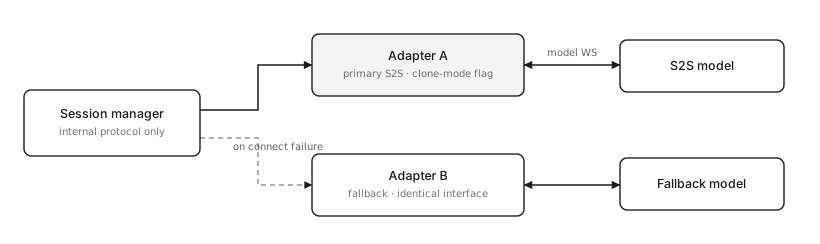
3. Connect the model in audio mode, with transcription on
Open the model session in its normal audio mode and enable both input and output transcription. Audio mode is what preserves the model's voice-activity detection, end-of-turn timing, barge-in handling, and tool calling. Output transcription is the part you will actually use to speak.
4. Create the voice clone
This is a one-time step, separate from the call path. Record a clean 10 to 20 second sample of the target voice and send it to your cloning provider's clone endpoint. Store the returned voice ID against the campaign or agent that should use it.
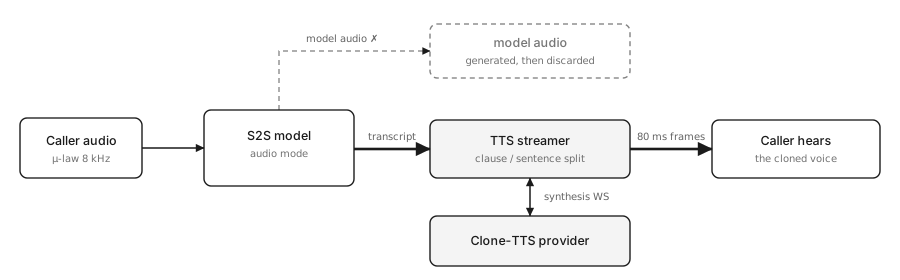
5. Turn on "clone mode": discard the model's audio, re-voice its transcript
In the adapter, do two things:
- Skip the branch that forwards the model's generated audio. The caller never hears the model.
- Feed the model's output transcript, chunk by chunk, into a streaming pipeline that splits it into speakable pieces, synthesises each through the cloned voice, and sends the audio out the media WebSocket in steady 80-millisecond frames.
The caller hears the cloned voice saying exactly what the model decided to say, while the model keeps running the conversation underneath.
6. Handle the greeting
To make the agent speak first, seed its opening line as a turn at call start. If you forward it naively the model treats it as something the caller said and replies to it, so instruct the model to say the line verbatim and then wait.
What does the architecture look like?
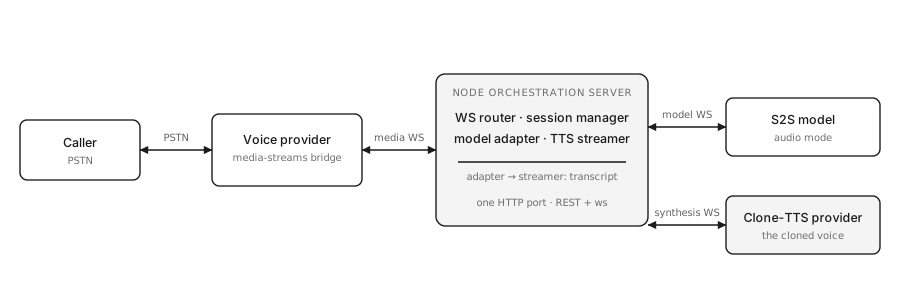
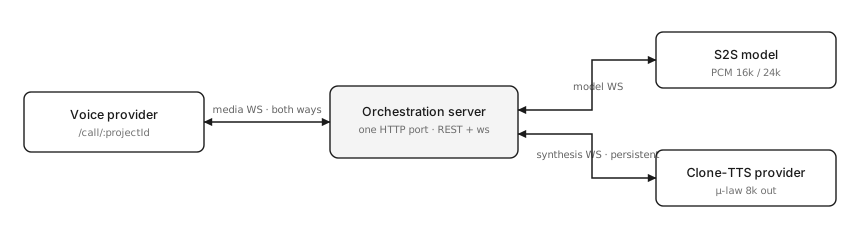
Three long-lived WebSocket connections meet at a per-call session object:
- The media socket, between the programmable-voice provider and your server: caller audio in, cloned voice out.
- The model socket, between your server and the S2S model: caller audio up, model events (including the transcript) down.
- The synthesis socket, between your server and the cloning voice provider: in its faster mode this stays open for the whole call so each sentence does not pay a fresh handshake.
The session object owns all three plus the greeting, the silence and goodbye timers, and cleanup.
How do you keep the latency low?
Every S2S turn has an unavoidable core: a brief window to confirm the caller has stopped, plus the model's own time to start responding. Clone mode adds a second synthesis stage on top, so the job is to stop that stage from stacking cleanly onto the first.
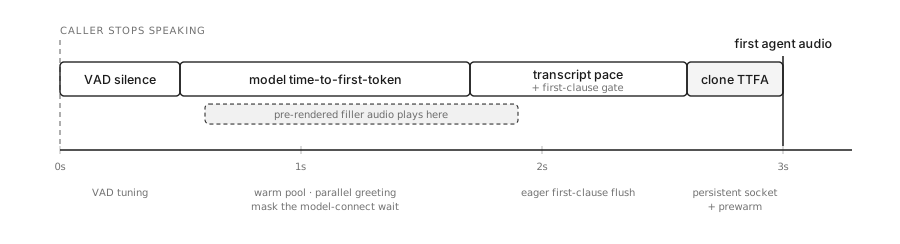
- Start on the first clause, not the first sentence. Release the synthesiser as soon as the first comma or clause boundary arrives on a turn, so the cloned voice begins within a few words.
- Keep the synthesis connection open. Opening and closing a socket per sentence adds a handshake and an audible gap. One reused connection removes both.
- Pre-record the filler. Synthesise a short acknowledgement ("one moment", "haan ji") once, in the cloned voice, while the model is still connecting, and cache it. When the caller stops and the model has not produced its first word yet, play that clip instantly and cut it off when the real response arrives.
- Play the greeting in parallel. Speak the opening line through the cloned voice while the model session is still being established.
- Tune the end-of-turn silence window. Trimming it cuts response time directly, but too aggressive and you clip people mid-sentence, especially on natural pauses between a Hindi phrase and an English one. Tune it against real recordings.
The limit you cannot fully remove
The model's words reach the cloning voice at the model's speaking pace, not as fast as it could produce raw text, and the cloned voice still needs its own moment to start. Even with every technique above, that leaves a delay on the order of a few seconds from the caller finishing to the first cloned word. Two things can remove it, each a trade-off: asking the model for text output instead of audio (not every S2S model supports it, and the ones that do behave a little differently), or switching to a different real-time model whose text can be produced all at once and synthesised in a single pass (different conversational style, higher usage cost). For most deployments, keeping the S2S brain and covering the gap with the pre-recorded filler and the parallel greeting is the right call.
What breaks on real calls?
Two problems that clean demos hide:
- Aliasing on the downsample. The model's audio is a higher sample rate than the phone network, and a naive downsample folds high-frequency energy back into the audible band as a crackle on every word. Use a proper anti-aliasing filter before the rate conversion, with its state carried across audio chunks.
- The echo self-interrupt loop. Phone lines have no echo cancellation, so the agent's own voice returns on the caller's channel, the model's voice-activity detection reads it as an interruption, and it clears its own audio mid-word, over and over. Fix it with a half-duplex gate: while the agent is speaking, do not forward the caller's channel to the model, and reopen it a fraction of a second after the agent stops.
Should you build this yourself?
If you have engineers who can own real-time audio, WebSocket plumbing, sample-rate conversion, latency profiling and the long tail of telephony quirks, the design above is reproducible. If you want a cloned brand voice on every call without standing up that team, that is what AutosysAI does: we select the telephony, build the real-time pipeline, tune the latency, set up the clone, integrate your CRM and messaging follow-up, and run it.
Get started
If a consistent, human-sounding brand voice on every call matters for your use case, the fastest path to a real answer is to walk through your call flows with us. Book a demo and we will spec the right stack for your languages, volumes and integrations, or estimate your monthly cost first using your own call numbers.